

How it works
From the first plan to the last sack, Anee is with you
64 tools that follow your season the way a farm lives it: plan, build the plan, plant, grow, protect, harvest, then look back. Every step has its tools, and Anee, your smart farm technician, works beside you at each one.
Step 1 The easiest way
⭐Our flagshipAnee does every stepAnee runs your whole season. You just follow.
Every analysis anee.io has, done for your own lots and kept up to date every morning. You will not have to figure out what to do each day: she plans it, tells you and your workers, and moves the work herself when the weather turns.


Five steps, then she takes over
-
Tell her once
Your lots and crop, your soil, your water and your workers. Answered once, kept for every season.
-
She finds the safest week
Twenty years of your town's weather and storms, the ENSO outlook, and the price at harvest.
-
She ranks the varieties
For your place and planting month: the newest releases, the trials and real harvests near you.
-
You pick a goal you can afford
Low, middle or full budget. She balances the fertilizer to it, every bag at its stage.
-
She writes every task, then runs it
From land preparation to harvest. Every morning, today's work for you and each worker.
Then Anee takes over. Every day, until the harvest.

Every day of the season, she
 The safest planting week
 The right variety for your lot
 Balanced nutrients for your goal
 Weather that moves the plan
 Today's work at 6 AM
 Ask her anything
 The shed and the payroll
The same hectare of palay
Traditional farming against precision farming with Anee Auto
😟 Traditional farming, what you do now
- ⏰ Fertilizer late or at the wrong stage−0.6 t
- 🐛 A pest seen too late−0.6 t
- 🌀 A typhoon week with no plan−0.4 t
- 🌾 Lodging: nitrogen at the wrong time−1.0 t
Total harvest 5.4 t₱108,000
Precision farming with Anee Auto
 Precision farming with Anee Auto
- 🎯 Fertilizer on time, by stage+0.6 t
- 🔍 Weekly scouting, an early spray+0.6 t
- 🌀 Work moved around the storm+0.4 t
- 🌾 Nitrogen split by stage: the crop stands+1.0 t
Total harvest 8.0 t₱160,000
About ₱52,000 more from one hectare, with quicker decisions, the right answer for your own field, balanced nutrients, and the planting and price forecasts behind every step.
An example on a hectare that could give about 8.0 tons, at ₱20 a kilo. Not a promise: your season depends on your field, the weather and the work done.

Or do it yourself, step by step
Step 2 Before day zero
Plan the season
Decide when, what, where and how before a single seed goes in. A mistake costs the least while it is still on paper.
Tap any tool to watch it work in the real app. Anee's face on a tool means she does that one for you.
Add each field once: where it is, its size, its soil, its water and what grew there last. Every analysis reads it from there, so you answer those questions one time, and every six months anee.io asks you to check it is still right.
- Place, size, soil and water for each lot
- Read by every analysis, never asked twice
- A reminder to check it every six months
Anee reads twenty years of your town's weather, the outlook for the coming months and how your crop grows, then names the window that gives it the best start and the safest harvest, and the weeks whose harvest sells best.
- A best window and a second choice
- The weeks ranked for the crop and for the price at harvest
- The risk in each month, said plainly
Not sure what to grow? Anee weighs your climate, the forecast, your soil and your water, and ranks the crops that should do best on your land this season.
- Crops ranked for your place and season
- Why each one fits, or does not
- What each one will need from you
Anee looks up the varieties of your crop and compares them for your area: yield, maturity, resistance and how they did in weather like yours.
- Varieties side by side
- Strong and weak points for your area
- The sources she used, to check yourself
Every registered variety of rice, corn, vegetables, root crops and fruit trees, with its days to harvest, its yield and what it resists. Filter them by what your farm needs, then let Anee rank the few that fit your place.
- Days to harvest, yield and resistance
- Rice, corn, vegetables, root crops and fruit trees
- Filters for what your farm needs
Pick your lots, the crop and the variety, and Anee writes the season for your place by growth stage: the bags of fertilizer and when, the sprays, the water each lot needs and what to watch for.
- Stage by stage, from land prep to harvest
- Several lots in one plan, each on its own day
- The water each lot needs, week by week
Draw your field on the map and Anee reads the newest Sentinel 2 picture and Sentinel 1 radar, which sees through typhoon clouds, then weighs the weather, ENSO and the soil of your area.
- Crop health and the weak spots in the field
- Radar when clouds hide the field
- Threats, soil and what to do next
Trace each field over a satellite view and the app gives you its area and the length of each side. Drop pins on the pump, the gate or the low spot that floods.
- The area and sides of every field
- Pins with notes and photos
- Attach a map to a lot, a task or a note
Plan with your team on a drawing: where the seedbed goes, how the water moves, who works which lot. Sketch a layout, a plan or a flow, and everyone works from the same picture.
- Shapes, lines, text and colors
- Draw over a photo of your field
- Kept in your gallery for any season
Resources shared by anee.io's partners, read right inside the app. It starts with every issue of the PhilRice Magazine: new varieties, field methods and the farmers who made them work.
- Every PhilRice Magazine issue, free to read
- Search by year, title or topic
- More partners to come
Step 3 Ready for day zero
Build and finalize the plan
Write the season task by task, count what it will use against what is in the shed, and let Anee check it before you commit.

Write every task of the season on its day: land prep, sowing, each fertilizer and spray with its rate, counted in days after sowing or transplanting. Keep one version for the wet season and one for the dry.
- Tasks on a day count (DAS, DAT, DAP)
- Materials and rules in one place
- Turn it into a cropping schedule
Your protocol adds up what its tasks will use and sets it against what you have, so you see what is left to buy. Stock the shed with fertilizer, seed and chemicals, each in its own unit.
- What the plan needs against what you have
- Counted in bags, liters or kilos
- Every move in and out on record
Tap the fertilizers you plan to use and NPK Plus adds up every nutrient, as the element and as the oxide, checks it against what your crop needs and shows the yield it can feed. The count uses no credits, and Anee can read the plan against your place, soil and season.
- N, P and K per hectare and in all
- Micronutrients and biofertilizers counted too
- Short, right or too much for your crop
Before you commit, let Anee read your protocol. She points out the problems, the strengths and the weak spots: a rate that is too high, a spray too close to harvest, a stage with nothing planned.
- Problems, strengths and weak spots
- Clear changes you can make
- Ask her more about it in chat
Step 4 Day zero
Set up and plant
Get every field ready on time, then turn the plan into a living cropping schedule. Each lot keeps its own day zero, so every task lands on the right date.
Pick your lots, each with its own crop and planting day. Anee dates every step of getting them ready, from clearing and plowing to harrowing, leveling and the seed, counted back from planting and fitted around your soil, the weather, your workers and your machines.
- Each lot with its own crop and planting day
- Your workers and machines planned on every step
- What it will all cost
Set the distance between rows and between plants and see how many seeds or kilos your field needs, how many plants will stand at harvest and the yield they can carry, with a warning when the stand is thin or crowded. Or start from the seeds you have, or the stand you want, and see the spacing.
- Seeds and kilos for a hectare or your lot
- The final stand after germination and thinning
- Warnings for crowding and for seeds a hill
Pick a crop and see how traditional farmers here plant it, step by step from getting the field ready to the harvest, each step on its day, with a video where there is a good one. Then see what to change for a higher yield, and send it to your Protocol Builder to make it your own.
- Every crop and fruit tree, step by step with the days
- What to change for a higher yield
- One tap into your Protocol Builder
Start a season from your protocol or from scratch. Every task, irrigation, hired service and payroll day sits on one board, dated from each lot's own day zero.
- Drag a task to move it
- Drafts and versions to try other plans
- Undo that still works after you log out
Add each field as a lot with its crop, variety, size and place. Each lot counts from its own day zero, so lots sown a week apart keep their own timing.
- Crop, variety, size and place per lot
- Attach the lot's map
- A different crop on each lot if you grow them
Keep a roster with each worker's rate, put people on each task, tick who came, and the labor cost adds itself up.
- Rates, attendance and payroll days
- Whole days and half days
- Labor cost counted as you go
Add each worker once, with their pay, skills and the weekdays they do not work. Put them on any season or land prep plan in a tap, and each season keeps its own record of their days and pay.
- One roster for every season
- Days off and half days kept with each person
- Changes reach every open season
Give a worker or a partner their own login, and decide module by module what they may see and what they may change.
- None, view or edit, per module
- A diary of every change and who made it
- One login for each person
Each season has a room for its team: chat with photos and voice notes, a shared whiteboard, live cameras, and Anee in the room to answer the whole team at once.
- A group chat for each season
- A whiteboard everyone can draw on
- Ask Anee together
Every morning at 6 AM your team gets the day's plan by email: what to do and on which lot.
- Sent on its own every day
- The whole team starts on the same page
- Nothing to remember to send
When you tick a fertilizer or spray task done, the shed takes it out of stock. Undo the tick and it goes back. The costs follow into your expenses.
- Stock on hand always adds up from the moves
- Each move names who made it
- Costs flow into the expenses report
 The Activities moduleFree on every plan
Every day on the board
Your season, day by day, on the Activities board
You build this board yourself. Add each task of your season on its own day, for each lot, counted from the day you planted, or bring in a protocol you wrote in the Protocol Builder in one go. Then you run it: add a note as you go, drag a task to another day when the weather turns, and tick it done, and the shed and the costs follow.
- ✍️You add each task, on its own day
- 📋Or bring in a protocol you wrote
- 🌱Each lot counted from its planting
- 🌦️The weather beside every day
- 👷Workers, materials and costs on each task
- 📧The day's plan by email to your workers
Rather not write the tasks yourself? With Anee Auto, Anee writes every task for you and keeps them on track.
 Settings
 Lots
 Workers
 Documentation
 Observations
 Notes
 Tags
 Gallery
 Growth Stages
 Weather
 Reports
A phone shows the season's activities board. A note is added to today from the day's menu. The scouting task is held and dragged to tomorrow. The urea task is ticked done. Then the Modules menu opens Growth Stages, where Lot 2 is in Active tillering at DAT 28, with what to do now, what to watch for and the stages ahead.
Step 5 Day by day
Grow with the count
Every day the app knows how old each lot is, what stage it is in and what the weather is about to do.

Pick any date and each lot shows its growth stage, what to do now and what to watch for. anee.io knows 85 Philippine crops, from palay and mais to gulay and fruit trees.
- Stage, do list and watch list per lot
- Annual and perennial crops
- Shown right on the board
See the forecast for your own farm beside your plan, so a spray is not wasted on the day before the rain.
- Rain and heat for the coming days
- Right beside the growth stages
- A reminder when rain falls on a spray day
Watch the clouds and rain of the last hours over your farm, fast forward the forecast, and see every typhoon with its path, its cone and how far it is from your field.
- Satellite clouds and rain radar, played back
- Typhoon tracks with the time at every forecast point
- Where the rain clusters are headed, hour by hour
From the third week on, hold your leaves against the leaf color chart and tap the color each one matches, or send Anee photos of the leaves and she reads the color. The checker says if urea is due now and how many kilos your area needs.
- Your own chart, or photos read by Anee
- Whether it is time for nitrogen
- How much urea, for your area
Crops do not read calendars. Anee reads a lot's records, its weather and your notes, works out the stage it is truly in, and moves that lot's stage count to match.
- The real stage, with her reasons
- What to do now and what to watch
- Your calendar dates stay as they are
Open the day and see each task on its lot. Tick it done, mark who worked, and add a photo or a voice note. The board keeps the record for your reports.
- Done and moved, all on record
- Workers and materials on each task
- Photos, clips and voice on any task
Tap the money on any day and see the cash to prepare: wages, materials, stock to buy and extra expenses, line by line. Or pick two days and see the total for the whole stretch, so the money is ready before the work.
- Each day's cost, line by line
- The total for any stretch of days
- Wages counted from who works each task
Tap one day, then another, and see how far apart they are, in days and in weeks, with each lot's DAS or DAT count at both ends. Handy for the days between two sprays, or before harvest.
- Days apart, in days and in weeks
- Each lot's day count at both ends
- From any day or any task
Quick Capture takes a photo, Quick Record takes a video and Quick Voice saves what you say as a note. It all lands with the season, easy to find later.
- Notes per season, per day or for everything
- A gallery of every photo and clip
- Tags that tie it all together
Put your own tags on tasks, notes, photos and contacts, like Buyer, Irrigation or Lot 2. Then find everything with a tag in one tap, in one season or across all of them.
- Your own words, on anything
- Filter the board by a tag
- All your tags on one page
Offline mode is always on: keep ticking tasks and writing notes where there is no signal. anee.io keeps your changes on the phone and sends them once the signal comes back.
- Always on, every plan
- Your recent seasons stay open
- Changes wait, then sync
Deleted a task, a note, a season or a report by mistake? It waits in the Trash for 30 days. Put it back in a tap, with everything that came with it, or let it go for good.
- Every delete waits 30 days
- Put back with everything it held
- Empty it yourself when you are sure
Each day the dashboard gives you one tip for the stage your crop is in, from what anee.io knows about each crop and stage. Tap it to ask Anee more.
- Read on your dashboard each morning
- Made for your crop and its stage
- Ask her more with one tap
Every few days anee.io gathers the farm news from many newsrooms: prices, the weather, government programs and new ways to farm. Each story ends with what it means for your farm, in Taglish and in English.
- The farm news of the week in one place
- What each story means for your farm
- In Taglish and in English
Any day any question
Ask Anee about your crops
Snap a photo of what worries you and ask in Tagalog or English. Anee studies the photo closely, checks the data related to your farm, then tells you what it is and what to do.
- 📷Reads a photo of the leaf, the pest or the field
- 🌾Knows your lot, its stage and your weather
- 🗣️Tagalog, Bisaya, Ilocano, Taglish or English
- ⚡Answers in seconds, about 4 credits
- 🧪Names the active ingredient that works
- 🌙Any hour, any day
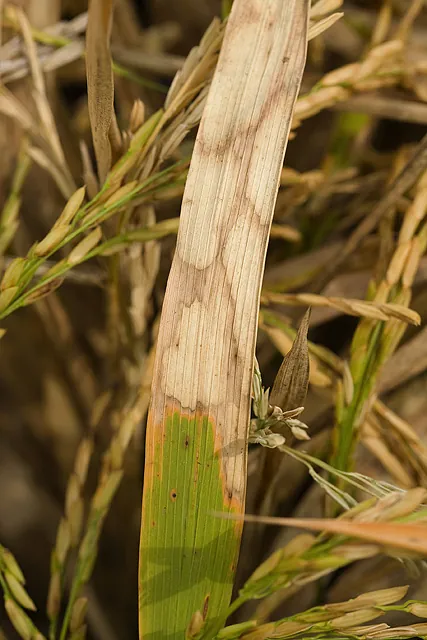
A phone shows the Anee chat: a grower attaches a photo of a rice leaf with pale blotches that have brown edges and asks what it is. Anee studies the photo closely, checks the related data, then answers. It looks like sheath blight. Hold off on more urea, spray a fungicide registered for it at the lower stems, and clear the straw and weeds after harvest.
Step 6 When something looks wrong
Catch problems early
Yellow leaves, holes in the leaves, weeds, a storm on the way. The sooner you know what it is and what to put on, the less it costs.

Ask in Tagalog or English and send a photo of the sick plant. Anee answers with your farm in mind: the lot, its stage, the weather and what you already applied.
- Photos, files and reports in the chat
- Answers that know your season
- Picks up where you left off
Halfway through the season, ask Anee to read it so far: where the crop stands, the risks ahead and what to do next.
- Where each lot stands now
- The risks in the coming weeks
- Next steps, in order
Pick your crop and where you see the damage: the leaves, the stems, the panicles or the roots. The finder names the pests that fit, how to be sure, and the active ingredients that control them, with their groups.
- Any crop, from palay to gulay
- How to be sure before you spray
- Active ingredients, their groups and products sold here
Spots, blight, rot or wilting? Pick your crop and the signs you see, and the finder names the diseases that fit, what to do first and the active ingredients that control them.
- Matched from the signs on your crop
- What to do first, before any spray
- Active ingredients, their groups and products sold here
Yellow, purple or burnt leaves? Pick your crop, where the change started and what it looks like. The finder names the nutrient your crop is likely short of, how to be sure, and the fertilizers sold here that supply it, with photos to compare.
- Any crop, with photos to compare
- How to be sure before you buy
- The fertilizers sold here that fix it
Pick your crop, how old it is and the weeds you see. The helper tells you what works at that age: the active ingredients for those weeds, group by group, or weeding by hand when no herbicide fits.
- By your crop and its age
- Active ingredients by group, and products sold here
- Hand weeding when no spray fits
Add the sprays and fertilizers you want to put on together, with how much of each. The checker says if they mix, the order to pour them in, how strong the spray is for your crop and its age, and what to watch. It knows over 7,000 products sold in the Philippines, and Anee can look up one it does not know, once: what she finds is kept for next time.
- Mix or not, pair by pair
- The mixing order and a jar test
- How strong the spray is for your crop
Open it from the Activities board. Pick a lot and what to check: nitrogen, phosphorus, potassium, a micronutrient, insects, diseases, weeds, or one named pest. The calendar shows, day by day, how long each product on your tasks keeps working, how critical that day is for your crop's stage, and where the gaps are. Try a product on a date before you buy it, and save the reading.
- Coverage day by day, as a calendar
- Gaps on the days that matter most
- Try a product on a date before you buy
Guides to the pests, diseases and weeds of Philippine crops: how to spot them, why they come and what to do about them.
- Written for Philippine farms
- What to look for, with pictures
- What to do, step by step
Post a photo to the feed or ask in a discussion room. Growers trade what worked for them and warn each other early.
- A news feed and discussion rooms
- Messages with photos and voice
- A ladder of 100 levels for helping out
Step 7 Ani time
Harvest and after
Write down what came off the field and where it went, while you still remember it.
After harvest, note your yield, moisture, price, buyer and any problems you saw. Next season you plan from real numbers, not memory.
- Yield and moisture per lot
- Who bought it and at what price
- Problems noted for next time
Put in your sacks, what the harvester takes, what the drying costs and the wet and dry prices, and see which way leaves you more money, and the dry price where drying starts to pay.
- Both ways side by side, after every cost
- The weight drying takes out
- The break even dry price
Give your farm manager a percent, a number of sacks or kilos of the whole harvest, paid in sacks or in money, keep sacks for your home food, and see what each of you gets and how to hand it over.
- The share counted from the whole harvest
- Home food out of your own share
- Paid in sacks, or in money at your price
Pick your crop and where you sell. See its farmgate price month by month since 1990, the forecast for this year and next with its likely range, the months it sells best, whether keeping the harvest pays, and the imports and bans that moved it.
- The best and the glut months
- This year and next, with the likely range
- Imports and bans, and what they did
A phonebook for everyone around your farm: workers, traders, buyers and suppliers, with notes and tags.
- Phone numbers, notes and tags
- Find a buyer in seconds
- Yours, across every season
Keep the season's references together: the protocol you followed, rules, receipts and any file, each with its own text and attachments.
- Text and files together
- Kept with the season
- Easy to find next year
Every photo, clip and drawing the season made, with albums you put together yourself, like the harvest or the lot that did best.
- Albums you make yourself
- Every season in one Global Gallery
- Pick a saved picture for a task or a record
Step 8 Look back
Reports and analysis
The records you kept all season add up on their own. See what it cost, what it earned and what to change.
Every worker day and the labor cost for the season, added up from the workers you put on each task. Nothing to type twice.
- Each worker at their own rate
- Kept on your Saved Reports tab
- Your busiest months, easy to see
Materials, services and labor: every peso the season cost, in one report built from your records.
- Built from the board and the shed
- Grouped so you see where it went
- Saved for the next season
Your harvest sales against everything you spent, so you see the real profit of the season.
- Sales from your observations
- Costs from your records
- The real profit, not a guess
Anee reads your finished season, from the plan to the harvest, and shows what went well, what went wrong and what to improve.
- A plain story of your season
- What to keep and what to change
- Ask her more about any part
Put two reports of the same type side by side, see the difference, and let Anee explain what changed and why.
- Any two seasons side by side
- The difference, line by line
- Anee explains what changed
One lot's finished work written as a step by step recipe: what was done, with what and on which day. A ready start for your next protocol.
- What worked, in order
- Rates and days from your real records
- A starting point for the next season
And then season after season
The next season starts smarter
Your best lot becomes next season's protocol, Compare Reports shows what changed, and Anee reads it all with you. Every season you record makes the next one easier to plan.


Your season, start to finish
Bring your next season to anee.io
Start free on the Libre plan, with no payment and no trial clock. 29 of the 64 tools are free on every plan. Anee's analyses run on credits, and some tools come with paid plans.
- No payment and no trial clock
- Works at the far lot, without signal
- Anee answers in Tagalog or English