How Do I Digitize Farm Records From a Notebook or Spreadsheet Into a Farm App?
To digitize farm records, do not copy every old page. Bring over the few numbers you will compare, start fresh with the current season, and keep the notebook as a backup for one season. anee.io, a farm app built for Filipino farmers, has no spreadsheet import. So you type the key records in and photograph the old pages into the season. On a paid plan, Anee can also read a photo of a page for you.
Farm records are tools for deciding. They show you the costs, the yields and what worked in past seasons. The records a farmer needs grow as the farm sells more. They come in seven kinds, from a plot history for each piece of land to a cash book.
Moving those records into an app is a chance to keep only what helps you decide. If you are still choosing between paper and a phone, read our fair comparison of a farm record keeping app and a notebook first. This guide is about the move itself.
Key points
- Bring over only what you will compare: lots, past yields and prices, main costs, workers and buyers.
- Start the app with the current season. The past goes in as short totals, not page by page.
- Photograph every old page, so a copy lives with the season even if the notebook gets wet.
- Keep the notebook beside the app for one season, then let the app take over.
What should I bring over from my notebook or spreadsheet?
Use this table as a moving list. It shows each kind of old record, what is worth bringing, and where it goes in anee.io.
| Old record | What to bring over | Where it goes in anee.io | Plan |
|---|---|---|---|
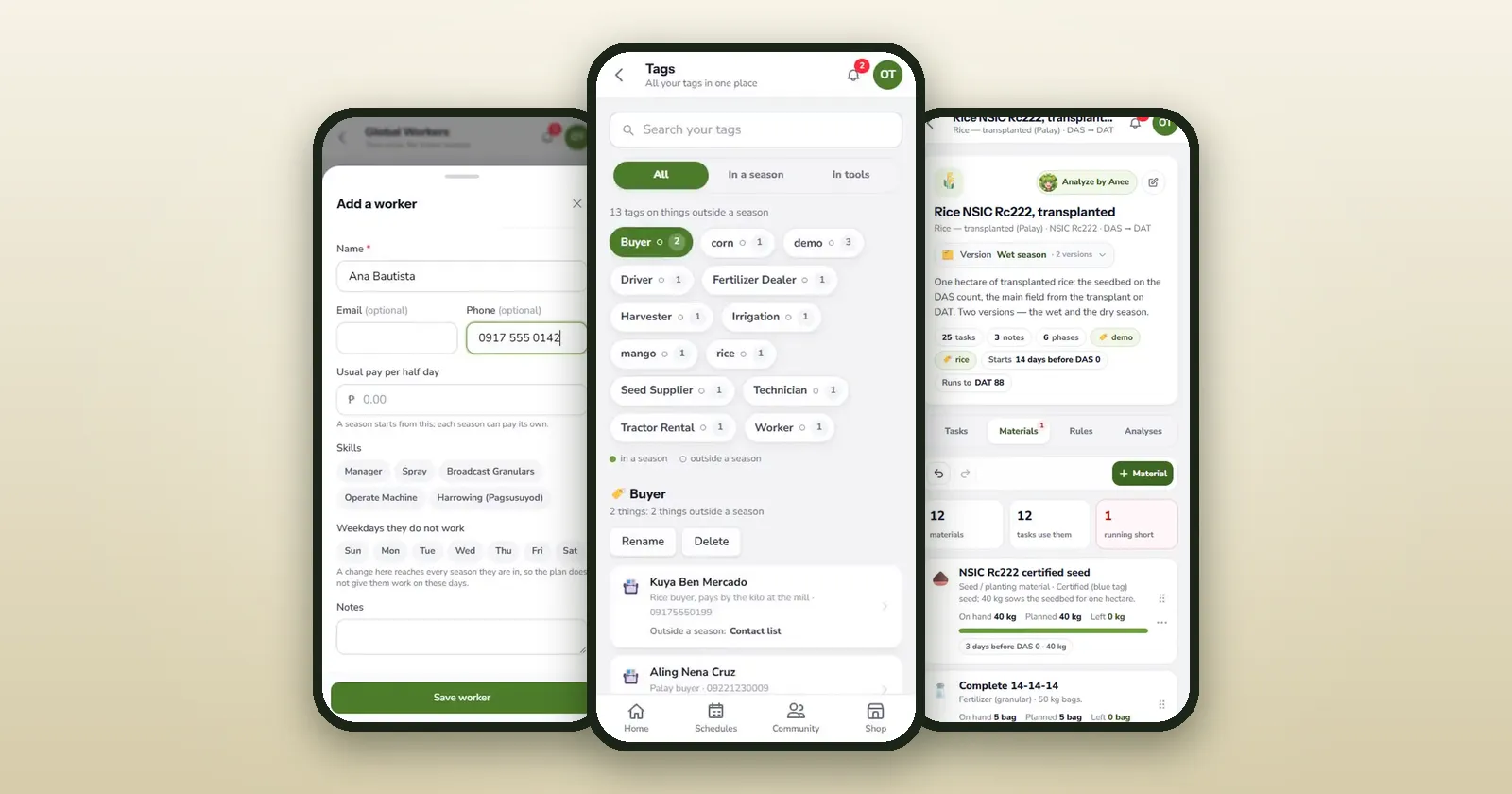
| Your fields | Name, size, crop, variety and place of each lot | Lots, with a map traced over the satellite view | Lots on every plan, maps from Libre plus Anee |
| Past harvests | Yield, moisture, price and buyer per lot, and the problems you saw | A note with the totals, or a past season with its Observations | Every plan |
| Past costs | Season totals for seed, fertilizer, labor and services | A note now, while this season's costs build from the board | Expenses report on Solo Farmer |
| Workers | Name, pay rate, skills and days off | Global Workers, added once for every season | Solo Farmer |
| Buyers and suppliers | Name, number and a short note | Contact List, with tags such as Buyer | Every plan |
| Stock in the shed | What is there now, in bags, liters or kilos | Inventory, as your opening stock | Solo Farmer |
| Your usual way of farming | The tasks and rates you repeat each season | Protocol Builder, one version for wet season and one for dry | Every plan |
| Receipts and papers | Photos or files | A gallery album, or files in Documentation | Files from Solo Farmer |
How do I digitize farm records, step by step?
Pick your start day
Begin with the season you are planting now, or the next one. A season that starts on paper and ends in the app is hard to add up.
Set up the farm once
Add your lots and your buyers and suppliers in the Contact List. On Solo Farmer, add your workers and the stock in the shed too. Your contacts and your worker roster carry over to every season.
Start the current season
Give each lot its day zero, then build the tasks in the Protocol Builder or straight on the cropping calendar.
Bring in last season's numbers
The quick way is one note with the yield, price, buyer and main costs of each lot. To put an old harvest in Observations, add that season, record its harvest, then archive it.
Photograph the old notebook
Quick Capture takes or uploads a photo straight into the season. Put the pages in a gallery album called Old records, and tag them the same way.
Run both for one season
Write in the notebook and tick in the app. Each Sunday, check that they match, and after harvest let the app take over.
What about a spreadsheet?
anee.io has no spreadsheet import, so plan to type the numbers you need. If your spreadsheet holds a few season totals, those fit in one note. Keep the file itself as your archive.
On a paid plan, you can also send Anee a photo of an old page or the spreadsheet file in the chat. Ask her to sum up the yield, the costs and the buyers of each season. It uses credits, and her reading of messy handwriting can be wrong, so check her numbers against the page before you type them in.
Typing in every old page takes weeks, and the season will not wait. So put in last season's totals, then spend your energy on ticking today's tasks. After one season of daily ticks, you will have a full season of clean records to compare against.
Sign up for Libre, add your lot and its planting day, and let each task you tick become a record that adds itself up.
Start freeHow do farm record keeping platforms compare?
Farm record keeping tools come in five kinds. Each one fits a different farm, so compare the kind before you compare the price.
| Kind | Good at | Watch for |
|---|---|---|
| Notebook | Costs little, needs no signal | No sums, no photos, and a flood can take it |
| Spreadsheet | Adds up for you | Needs a computer, and is easy to fill in later from memory |
| Free rice calendar app | A rice calendar, expenses, harvest and a season summary of costs and income | Rice only, on Android |
| Subscription farm app, such as anee.io | Tasks per lot, workers, stock, photos and reports that add up, offline too | A monthly or yearly fee for workers, stock and all reports |
| Accounting app | Books, invoices and taxes | It does not know your lots, crops or growth stages |
What to ask before you subscribe
- Can I bring my old records in, and how? In anee.io you type them, or have Anee read a photo.
- Does it work without signal? anee.io's offline mode is on for every plan.
- Can my foreman record too? On Farm Owner, each worker gets a login with view or edit per module.
- What happens to my records if I stop paying? In anee.io, your account returns to Libre and you can still read them.
- What does it cost in pesos, and how do I pay? See our guide to farm management software cost.
What are the limits of moving to anee.io?
- There is no spreadsheet import. Old records go in by hand or through Anee, who needs a paid plan and credits.
- Libre holds one active season with one lot, plus one archived season, so old seasons fit better on Solo Farmer.
- Workers, inventory and file uploads in Documentation start at Solo Farmer.
- Your data stays yours. anee.io never sells your content, and you keep it even if you go back to Libre.