Where Can I Download a Farm Management App for Android?
You can download a farm app for Android from Google Play, where you will find rice apps such as Binhing Palay and free rice calendar apps. anee.io, a farm app built for Filipino farmers, works another way. It is a web app, so you open anee.io in Chrome and install it to your home screen. It then opens like any other app, offline mode included, but it is not in the Play Store.
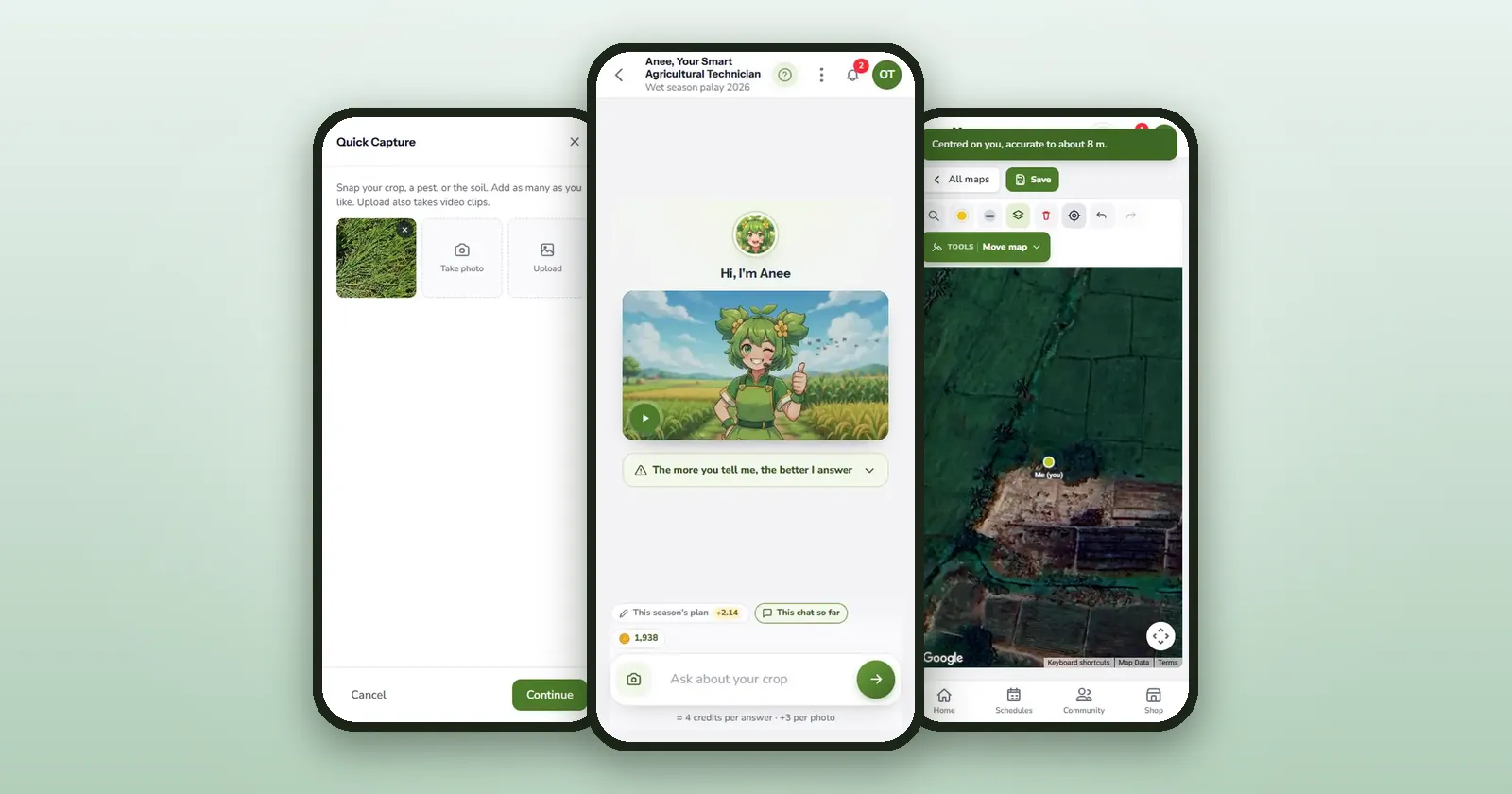
Most farmers look for apps in the Play Store first, and that works for many tools. But some farm apps, anee.io among them, are web apps. They live on the web and install from the browser instead of a store.
Both kinds run on Android phones. So the better question is whether an app fits your phone, your signal and your farm. Here is where to get farm apps, how to install anee.io step by step, and what to check before you install anything.
Key points
- The main rice apps are on Google Play, and their maker's Rice Apps page also offers APK files.
- anee.io is not in the Play Store. Open it in Chrome, log in, then choose Install from the menu.
- Before you install any farm app, check its permissions, storage, offline use, data use and language.
- anee.io's Libre plan is free, with a few ads. Paid plans start at PHP 70 a month.
Where can I download a farm management app for Android?
There are four ways a farm management app reaches an Android phone. Whichever way you choose, get the app from its maker.
| Where | What you get | Examples you can check |
|---|---|---|
| Google Play Store | An app installed and updated by the store | Binhing Palay and free rice calendar apps |
| An official APK file | The same app as a file, for phones without Google Play | The APK links on the maker's Rice Apps page |
| A web app, installed from Chrome | An app icon on your home screen, with updates coming from the web | anee.io |
| A web page | A tool you open in the browser each time | The Rice Crop Manager Advisory Service |
On Google Play, look for a free rice calendar app. A good one dates the season from your variety and planting method, and it keeps your expenses and harvest too. Our guide to the best free farm app compares the free tools in more detail.
How do I install anee.io on an Android phone?
It takes about a minute with signal. These steps follow Google's own Chrome Help.
Open Chrome
Use Chrome on your Android phone, then type anee.io in the address bar.
Sign up or log in
Create a free account on the sign up page, or log in. The app then opens on your own farm.
Tap the menu
Tap More, the three dots at the right end of the address bar.
Tap Install
Choose Install and create shortcut, then Install. The words can differ by phone, so look for Install or Add to Home screen if you do not see it.
Open it from your home screen
The anee.io icon now sits with your other apps. It opens in its own window, without the browser's address bar.
Open your season once with signal
anee.io then keeps your recent seasons on the phone, so the board opens in the field with no signal.
Offline mode is on for every plan, the free one too. You tick tasks and write notes in the paddy, and the changes sync when the signal returns. Our guide to a farm app without internet explains how that works.
If your phone has no Google Play, an APK file is the other way in. Download it only from the maker's own page. Never install one that a stranger forwards in a group chat, because nobody can tell what someone changed inside it.
Sign up free in Chrome, then tap Install. Your season opens like any other app, even with no signal.
Start freeWhat should I check before installing a farm app for Android?
Read the store page or the website first. Then test the app for a week on one lot before you put the whole farm in it.
| Check | What to look for | anee.io |
|---|---|---|
| Permissions | Camera, microphone and location only when you use them | Chrome asks the first time, and you can allow it once, every visit or never |
| Storage | Room on your phone for the app and its saved data | No store download, and photos count toward your plan's online storage, 1 GB on Libre |
| Works offline | Turn on airplane mode and try to tick a task | The board and notes work, while Anee and the weather wait for signal |
| Data use | Photos and videos use far more data than text | Ticks and notes are small, so keep video clips short |
| Language | Words your family and crew can read | Screens in English, and Anee answers in Tagalog, Bisaya, Ilocano, Taglish or English |
| Who answers you | A real contact, and a recent update | Email support@anee.io, answered by a person, usually within a business day |
| Price | Free, with ads, or paid, and how you pay | Libre is free with a few ads, and paid plans are paid from any bank or wallet app |
What Android permissions mean
Android Help lists the choices for camera, microphone and location. You can allow them only while you use the app, have the phone ask every time, or not allow them. To change a store app later, go to Settings, Apps, pick the app, then Permissions. For a web app, open Chrome's Settings, then Site settings.
Which farm apps do Filipino farmers use?
We found no official count of farm app users in the Philippines. So here are the kinds of apps farmers use, with examples you can check yourself.
- Rice advisory apps: Binhing Palay, a rice calendar app, the MOET app, the LCC app and the RCM Advisory Service all sit on one Rice Apps page.
- Planning and record apps: they date the work and add up costs and harvests. anee.io is one, built for Filipino farmers, and our guide to the best farm management app shows what to expect.
- Pest and disease photo apps: you take a photo and get a likely cause. See our guide to the plant disease identification app.
- Weather apps: forecasts, rain radar and typhoon warnings for your town.
- Chat and community apps: where growers trade advice and prices with each other.
You do not need one app for everything. A rice farmer might keep the rice advisory apps for advice, a weather app for rain, and one app for the season's plan and records.
Is a web app as good as a Play Store app?
For daily farm work, it does the same job. It has an icon on your home screen, opens in its own window and keeps working offline. Still, there are two differences to know. First, you will not find anee.io by searching the Play Store. Second, offline changes that have not synced yet live in Chrome. So do not clear Chrome's data for anee.io before you reach signal.